Work with Docker Images
- Quick Start
- Docker Images and Job Examples (this document)
- How to Manage Data
- How to Debug Jobs
- Advanced Jobs
- Use Marketplace
- Use VSCode Extension
- Use Jupyter Notebook Extension
OpenPAI uses Docker to provide consistent and independent environments. With Docker, OpenPAI can serve multiple job requests on the same server. The job environment depends significantly on the docker image you select.
Introduction to Pre-built Docker Images
The quick start tutorial uses a pre-built TensorFlow image, openpai/standard:python_3.6-tensorflow_1.15.0-gpu.
Apart from it, OpenPAI provides many out-of-the-box images for different deep learning frameworks. Here is a table for them:
| image | tag | CUDA version | required Driver version |
|---|---|---|---|
| openpai/standard | python_3.6-pytorch_1.1.0-gpu | 10.0 | >= 410.48 |
| openpai/standard | python_3.6-pytorch_1.2.0-gpu | 10.0 | >= 410.48 |
| openpai/standard | python_3.6-pytorch_1.3.1-gpu | 10.1 | >= 418.39 |
| openpai/standard | python_3.6-pytorch_1.4.0-gpu | 10.1 | >= 418.39 |
| openpai/standard | python_3.6-tensorflow_1.14.0-gpu | 10.0 | >= 410.48 |
| openpai/standard | python_3.6-tensorflow_1.15.0-gpu | 10.0 | >= 410.48 |
| openpai/standard | python_3.6-tensorflow_2.0.0-gpu | 10.0 | >= 410.48 |
| openpai/standard | python_3.6-tensorflow_2.1.0-gpu | 10.1 | >= 418.39 |
| openpai/standard | python_3.6-mxnet_1.5.1-gpu | 10.1 | >= 418.39 |
| openpai/standard | python_3.6-cntk_2.7-gpu | 10.1 | >= 418.39 |
| openpai/standard | python_3.6-pytorch_1.1.0-cpu | - | - |
| openpai/standard | python_3.6-pytorch_1.2.0-cpu | - | - |
| openpai/standard | python_3.6-pytorch_1.3.1-cpu | - | - |
| openpai/standard | python_3.6-pytorch_1.4.0-cpu | - | - |
| openpai/standard | python_3.6-tensorflow_1.14.0-cpu | - | - |
| openpai/standard | python_3.6-tensorflow_1.15.0-cpu | - | - |
| openpai/standard | python_3.6-tensorflow_2.0.0-cpu | - | - |
| openpai/standard | python_3.6-tensorflow_2.1.0-cpu | - | - |
| openpai/standard | python_3.6-mxnet_1.5.1-cpu | - | - |
| openpai/standard | python_3.6-cntk_2.7-cpu | - | - |
The tag of these images indicates the version of the built-in deep learning framework and whether it supports GPU. Some GPU-supported dockers require a high version of your NVIDIA driver, because of the requirement of CUDA. If you are not sure about the driver version of the cluster, please ask your administrator.
Job Examples based on Pre-built Images
pytorch_cifar10 and tensorflow_cifar10 provides CIFAR-10 training examples based on those pre-built images. To be detailed, the following examples are based on PyTorch images:
- Resnet18_1gpu.yaml: CIFAR-10 training with a single GPU and PyTorch
- Resnet18_12cpu.yaml: CIFAR-10 training with CPUs and PyTorch
- Resnet18_4gpu.yaml: CIFAR-10 training with multiple GPUs and PyTorch
- Restnet18_horovod.yaml: CIFAR-10 training with multiple GPUs, Horovod, and PyTorch
There are also CPU/GPU/Multi-GPU/Horovod job examples for TensorFlow. Please check tensorflow_cifar10 for details.
Use Your Own Custom Image
If you want to build your own custom image instead of pre-built images, it is recommended to build it basing on ubuntu system, which includes bash, apt and other required dependency. Then you could add any requirements your job needs in the docker image, for example, python, pip and tensorflow etc. Please take care of potential conflicts when adding additional dependencies.
How to use Images from Private Registry
By default, OpenPAI will pull images from the official Docker Hub, which is a public docker registry. The pre-built images are all available in this public registry.
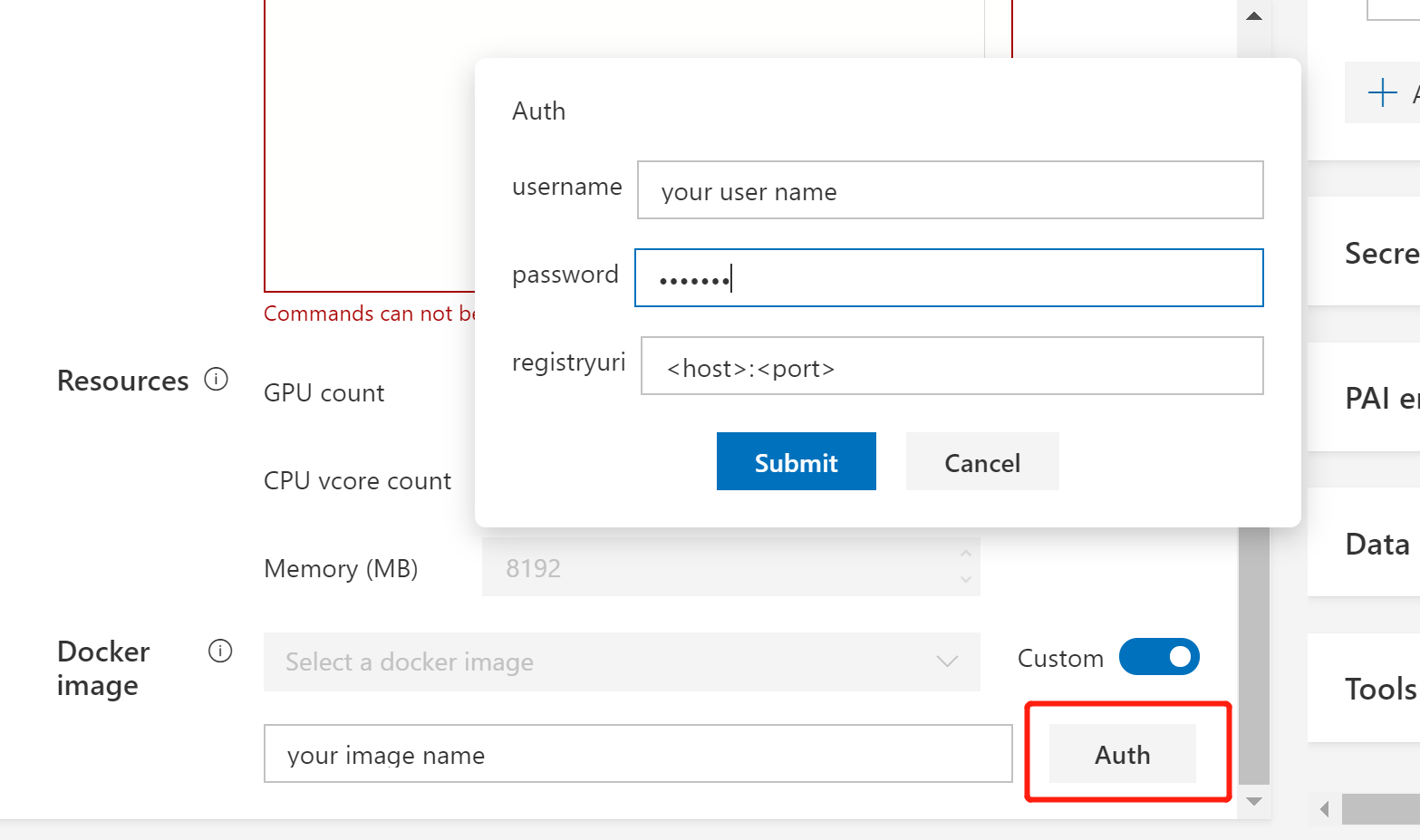
If you want to use a private registry, please toggle the Custom botton, then click the Auth button, and fill in the required information. If your authorization information is invalid, OpenPAI will inform you of an authorization failure after job submission.